Atomic Designer V5 Now Integrates Zephyr RTOS
The latest release of Atomic Designer V5 introduces integration with Zephyr, a highly modular, real-time operating system designed for resource-constrained devices. This addition significantly expands the capabilities of Atomic Designer, enabling developers to build robust, multi-threaded applications with deterministic behavior across a wide range of embedded platforms.
Key Technical Highlights:
- Native Zephyr Support: Seamless configuration and build workflows for Zephyr-based projects directly within Atomic Designer.
- Extensive Example Projects: Pre-configured templates showcasing advanced features such as device drivers, networking stacks, and power management.
- Broad Target Coverage: Support for multiple architectures including ARM Cortex-M, RISC-V, and x86, ensuring flexibility for IoT and industrial applications.
- Integrated Toolchain: Optimized cross-compilation and debugging environment with J-Link and ST-LINK support for real hardware targets.
- Scalable Architecture: Leverage Zephyr’s modular kernel to implement real-time scheduling, inter-thread communication, and hardware abstraction layers.
With Zephyr in Atomic Designer V5, developers can accelerate development cycles, reduce integration complexity, and deploy production-grade firmware with confidence.
Get Started Today
Zephyr-enabled Atomic Designer V5 is now available in our shop. Explore the included sample projects and supported targets to unlock the full potential of your embedded designs.
Zephyr Installation Requirements for Atomic Designer V5
When using Atomic Designer V5 together with Zephyr, the Zephyr RTOS must be installed beforehand.
Important Notes:
- Atomic Designer V5 is compatible only with the Windows version of Zephyr.
- Follow the official installation guide for Zephyr here: https://docs.zephyrproject.org/latest/develop/getting_started/index.html
Environment Configuration:
Atomic Designer V5 relies on the ZEPHYR_BASE environment variable to locate the Zephyr installation.
Example:
ZEPHYR_BASE = C:\Users\<username>\zephyrproject\zephyr
Additional Tools:
Depending on the target board, several programming tools must also be installed (e.g., J-Link, ST-LINK, or other vendor-specific utilities).
Atomic Designer V5 uses the following programming options:
ZephyrNrfjprog
ZephyrJlink
ZephyrST-Link
ZephyrArduino
Install nRF command line tools. Downl;oad and install the installer nrf-command-line-tools-10.24.2-x64.exe
Install SEGGER jlink tool JLink_Windows_V890_x86_64.exe or newer.
Install OpenOCD from openocd-20250710.7z.
Install Arduino IDE and set the directory location of bossa.exe in the path environment variable.
Usally the path is: C:\Users\<user>\AppData\Local\Arduino15\packages\arduino\tools\bossac\1.9.1-arduino2\
Zephyr projects
A Zephyr project can be created the same way as other projects. It only requires two things:
- Target Zephyr
- Board selection
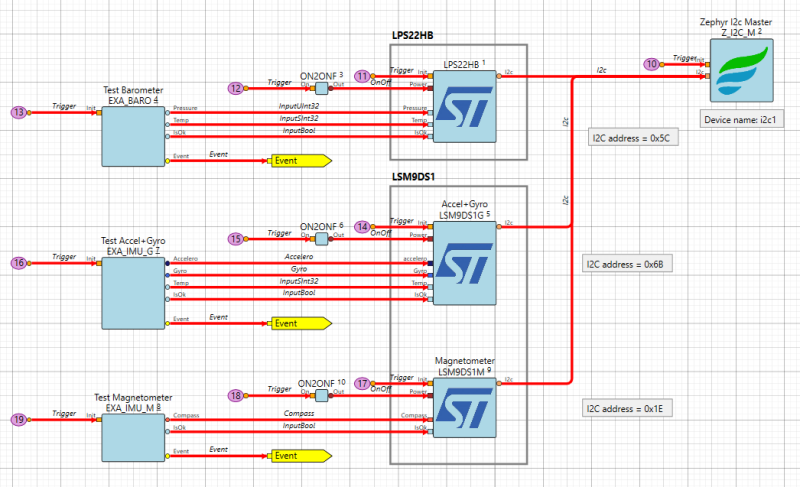
A Zephyr component package is available for basic hardware functions, like pins, uarts, spi, i2c. New hardware functions may be implemented as well.
Zephyr examples
The Zephyr package is supplied with a number of sample projects.
See example project for Arduino nano 33 ble.
Board type is: arduino_nano_33_ble